Tuesday, 14 January 2014

Lighting Render

I have spend these few days to set up my interior lighting.
For my story, its going to be 2 different atmosphere.,
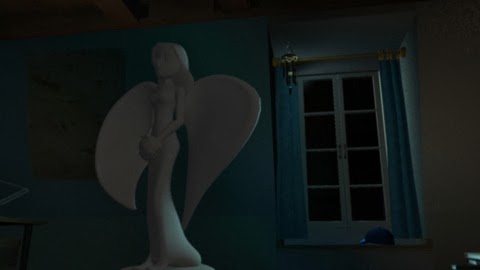
At first the boy is in a dark room, without the light comes in from the pentacle window.
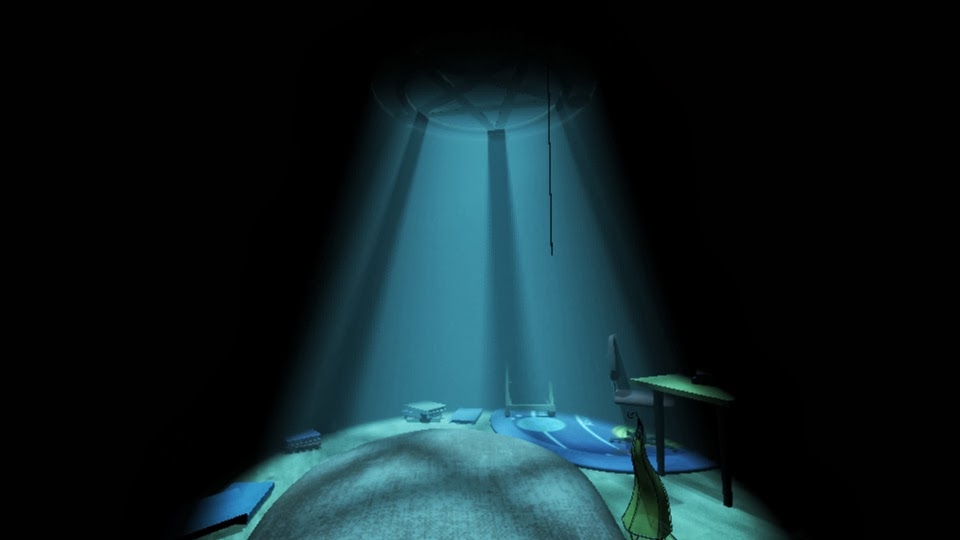
The second one is the light comes in and make the whole interior become brighter.

this is the image before the lights comes from the pentacle window


* For the technical issue i facing.. the problem still havent solve yet..

I have changed a way to do my light fog. Im going to make it in different render layer.
The problem I'm still facing are :
I cant render the shadow passes only and comp in the post-production. I have to figure it out.
Second, when i changed the way to do my work, another problem is the light pass through my object (cloth) as the image above.

Will keep exploring and fix it soon ! (MUST)


and this is after the light comes in
and turn on the floor lamp

Saturday, 11 January 2014

light and shadow issue update 2

I have tested the light fog
And Im just realize the light didnt cast a shadow on the cloth. (from my story, the cloth should block the light, the light only comes in when the boy pull down the cloth)

However, when I cast shadow on the light fog, some problem coming out again.
the light fog gone at the half way.

I tried to fix it, I been through websites, asking friends, get suggestion from tutor.
And it still havent completely solve it yet.

At this moment. Im still figuring out another way to get the result I want.
the next thing Im going to figure another way to get this lighting problem solve.
I will try not to use parti_volume and transmat, and jsut normal lighting render and cast shadow .
After that put them in different render layer .
hopefully will get a result .

And this is the animatic updated version.
Due to the cinematography rules., I have made the changes for my animatic


Sunday, 5 January 2014

Technical Issue

Problems that I facing today is the shadow inside light fog.
I created the light fog and its so beautiful. But when an object is under the light fog and it is without shadow , it will make the light look fake and make the scene unrealistic .

I tried different ways to create the shadow inside the light fog.
Found out most of the result can get it if using maya software to render it out.
As far as I know, maya software render is not as nice as mental ray rendering.

When I got the result of shadow inside the light fog, it wont showing the Fog .
but when when I get the ligh fog, i cant get the shadow inside the light.
I tried using, parti_volume, transmat, mental ray lambert and polygon primitives to create the fog.
Every ways Im using still cannot get the result I want.

this is the light fog with a shadow inside


and this is the shadow inside the light . but without the Fog


I have tried batch render passes and comp these 2 images together .
But I still can't get the result I want, the shadow and the light fog didn't match together very well at all.

Lastly. 
I try to enlarge the lambert assigned with the transmat n parti_volume.
and I got the result I want.! 
but still there is some mistake and also hv to keep improving n exploring the shadow working.
However, the rendering time is so long to get the result I want., it took 8 minutes to render a image .just for the 3 lightsand the environment.

Will keep exploring and try to figure out a way to reduce the rendering time.. 
At this moment, I have to keep set up the lights for the interior.. 

Here is the image for the result I got.


Saturday, 4 January 2014

Lighting test

Today I am spending my time for the lighting test.
First of all I try to create the translucent lamp in maya.
I experiment the attribute of the material. Keep exploring the translucent and transparency.
Was trying to create the light come through from a thin paper of the lamp..
I went to digital tutor website and search and learn for the technique of creating the translucent lamp.
From there I have explored a new shader I didn't use before.
 It is  mb_shadow_transparency  in  mental ray shadow material.
It can create the colour shadow and cast on surrounding. when the light pass through the material.

Furthermore, I have spent long hours for the light fog.
I have created and experimented light fog before. But it is just for the light without any object under the light fog and cast the shadow on floor.

For this project. the character will standing under the light . So there are the shadows of the Pentacle window and also the Character.

I have created the spot light for the light fog from the window. At first I was creating one spot light to create the fog and also make the shadow. But its doesn't work really well. If I want to get the nice fog it will make the shadow unclear and having the noisy shadow.

As a result, I have created 2 spot light , and one is for the shadow, and another is for the light fog.
The next thing I hv to do is start to create light and make the interior become nicely with lights.

here are the images of the light fog and the translucent lamp on the floor.l


Friday, 3 January 2014

Texturing Step

During this holiday.
I have spent my time on texturing.
It still havent complete yet.

But most of the objects are textured.
and setted up camera ( for the previous update version of animatic )

will update the lighting n render images soon.
Here is the print screen images


Moreover, I have edit the first shot of the camera angle.
From the first scene, I hope to let audience know who is the boy, what his family doing.
Give the information to the audience about the back story of the character

here is the video playblast of the first scene